Reference Desk #9 — Write Now with Scrivener

I’ve made no secret that Scrivener is my tool of choice for writing novels. Now — like everyone else in the pandemic — they’ve announced a podcast. It’s called “Write Now with Scrivener,” and it’s scheduled to come out monthly. Thus far, there’s only one episode.

Like any series, I don’t think the inaugural episode is enough to judge a podcast, but I decided to check it out and see what it has to offer.

The Interview

The host is Kirk McElhern, author of “Take Control of Scrivener,” which is certainly on brand. He’s not somebody I’m familiar with, so I had no expectations. McElhern seems to have prepped well for the interview, and had solid knowledge of his subject, but I didn’t feel like he asked any particularly surprising questions or drew out any great insights.

Part of it, perhaps, is that the interviewee for this episode is Peter Robinson. He’s the author of the Alan Banks series. With more than thirty published novels, he’s clearly a successful author, but I don’t read a lot of detective mysteries, and I’m not familiar with his work. So again I came in with no expectations.

We learn that Robinson eschews outlines (can we please stop using the word “pantser” for this?) when starting a new book, but builds an outline as he goes to keep himself organized. As someone who outlines, I always find this a little bit amazing. Even more amazing to me is that he doesn’t know the ending. I’ve only ever dabbled in mystery, but it seems difficult to know where you’re going in the genre without an idea of the ending. It goes to show that writers can have very different processes to achieve similar results.

The Obligatory Bit About Scrivener

The final few minutes of the podcast was reserved to discuss how Robinson uses Scrivener. This was the bit I had concerns about. On the one hand, perhaps I would get a couple of useful tips. On the other hand, perhaps it’s just very thinly veiled advertising by the patrons of the podcast.

Robinson dutifully explained that he writes scene by scene, in fairly small chunks, and that Scrivener makes it easy to rearrange those scenes with drag-and-drop, or pull things out and save them for later. He also uses snapshots before changing a scene to compare the different versions afterward.

Having used Scrivener for a few years, I didn’t really get anything new out of this, and unfortunately it felt a little bit like advertising. However, if you’re new to Scrivener, these are the kinds of simple, straightforward features that make the product good for writing novels, and they’re useful to know about.

The Verdict?

As I said before, I’ll withhold judgement until I’ve heard a couple episodes. Overall, I found the chat with Peter Robinson interesting, even if I’m not a reader of his books. I hope that they’re able to get authors from various genres for future episodes.

I’m honestly a bit worried about the “how do you use Scrivener” bit. As much as I like the product, it feels a little too advertisey. I suspect that most writers are going to  talk about the same handful of main features: the ones at the core of what makes Scrivener good. What might be able to make this segment shine is an author who really utilizes some of the more hidden features.

Episode 57: Jonas Enander, Astropyhsicist Write Now with Scrivener

Jonas Enander is an astrophysicist whose book is entitled Facing Infinity: Black Holes and Our Place on Earth. Show notes: Jonas Enander (https://jonasenander.com/) Facing Infinity (https://facinginfinity.com/) Jonas Enander on Instagram (https://www.instagram.com/enander_jonas/) DEVONthink (https://www.devontechnologies.com/apps/devonthink) Ed Yong: An Immense World (https://edyong.me/an-immense-world) Learn more about Scrivener (https://www.literatureandlatte.com/scrivener/overview), and check out the ebook Take Control of Scrivener (https://www.literatureandlatte.com/store). If you like the podcast, please follow it on Apple Podcasts (https://podcasts.apple.com/us/podcast/write-now-with-scrivener/id1568550068) or your favorite podcast app. Leave a rating or review, and tell your friends. And check out past episodes of Write Now with Scrivener (https://podcast.scrivenerapp.com).
  1. Episode 57: Jonas Enander, Astropyhsicist
  2. Episode 56: Alexander Rose, Historian
  3. Episode 55: Maria Reva, Booker Longlisted Author of Endling
  4. Episode 54: Tim Queeney, Author of a History of Rope
  5. Episode 53: Isabella Valeri, Author of Letters from the Dead

Reference Desk #8 — Working it Out

There’s something raw and awkward about a rough draft. It’s hard enough to be confident about work that’s polished to a mirror shine, and it can outright hurt to reveal the grotesque early versions of the art we’re passionately trying to create, in the midst of its creation. But it’s immensely reassuring to be reminded that it’s like that for everyone!

There’s a rare thing that happens sometimes in great comedies. The writers insert an episode, a scene, or even a few lines of dialogue that create a dramatic, emotional impact. A little island of seriousness among the jokes.

When this is done correctly, the knife twist from lighthearted laughs to pathos can be every bit as impactful as a similar scene within a drama, where the entire show may have been building up to it.

Fans of Futurama will know what I mean if I mention Fry’s dog, Seymour. Fans of Scrubs will remember Ben Sullivan. And fans of Adventure Time might just get a little choked up when they hear “Everything Stays.”

Birbigs

I’ve been a fan of Mike Birbiglia for a while, and I think it’s mostly because he lives on that edge between humor and pathos. He considers himself a stand-up comedian, but his on- and off-Broadway shows often feel like half dramatic one-man-show, half stand-up special. They revolve around events as serious as sleep-walking through a second-story window or being T-boned in a hit-and-run car accident.

Working it Out” is Birbiglia’s podcast. As you might expect from a comedian’s podcast, there are plenty of popular comedian guests, from John Mulaney and Hannah Gadsby to Jimmy Kimmel and Frank Oz. But rather than being a simple excuse to joke with friends and acquaintances, Mike makes it something halfway between an interview show and a critique circle. It turns out he is deeply studious when it comes to the craft of telling jokes, and the craft of storytelling.

The through-line of the 40 episodes that have been released so far is the new show that Birbiglia is developing. It started with the title “The YMCA Pool,” but he now calls it “The Old Man and the Pool.” It’s a comedy show about getting older and coming to grips with your own mortality.

In the first episode, Mike tries out some of the material he’s working on with his friend and “This American Life” luminary, Ira Glass. Ira gives him advice that involves significant rewriting, and he accepts it graciously. By episode 25, when Ira returns, Mike has done his rewrite. They run through it again, and discuss it in depth. Mike jokingly asks, after half a year of revisions, how close his story is to being worthy of “This American Life.” And Ira deadpans, “halfway there.”

The Vulnerability of Revision

What makes Birbiglia’s comedy work so well, and the knife-twist that makes it hit so hard, is his vulnerability on stage. The podcast is different from a stage show, of course, but it still works because he’s willing to be vulnerable in front of an audience.

It’s clear that Mike doesn’t shy away from the hard work of revision. Guests bring their work in progress, and he brings his, and they hash it out, every episode. Some of the guests are clearly less into the workshopping aspect than others, but Birbiglia’s enthusiasm shows through.

If you’ve read any of my writing development journals, you can probably see why this appeals to me. There’s something raw and awkward about a rough draft. It’s hard enough to be confident about work that’s polished to a mirror shine, and it can outright hurt to reveal the grotesque early versions of the art we’re passionately trying to create, in the midst of its creation. But it’s immensely reassuring to be reminded that it’s like that for everyone! Art doesn’t spring fully formed from our minds, like Athena from the head of Zeus. It has to be shaped and reshaped. Bits added on, and bits sanded off. The slow, steady grind of progress.

Of course, it helps to have a few jokes to lighten the mood, even if they are jokes about death.

196. Michael Che: An Amateur Therapy Session Mike Birbiglia's Working It Out

Mike started this podcast so that one day Michael Che would come on. Today is that day. In this all-timer episode, Mike and Che work out tons of jokes and discuss the advice Lorne Michaels gave to Che that he’ll never forget, how Che went from designing and selling t-shirts on the street to being a stand-up comic, and what keeps him coming back to SNL. Plus, the time Che nearly did something to Colin Jost on air that he would really regret.Please consider donating to Food Bank For NYC Hosted by Simplecast, an AdsWizz company. See pcm.adswizz.com for information about our collection and use of personal data for advertising.
  1. 196. Michael Che: An Amateur Therapy Session
  2. 195. Arthur Brooks: The Science of Happiness and Humor
  3. 194. Pete Holmes Returns: Vulnerability is Everything
  4. 193. Vir Das Returns: How to Find Your Voice, Literally
  5. 192. Leanne Morgan: In The Presence of a Comedy Angel

Story in Games: Experience and Participation

Games are a special narrative medium for two reasons: they’re experiential and they’re participatory…While other media can give the reader or viewer insight into a character’s thoughts and beliefs, games have a unique power to make the player feel unified with the character.

This is still a blog about writing fiction, but in this post I’m going to talk about video games and the way they can provide some unique narrative experiences that are difficult or impossible to achieve in other media.

Even if you’re not interested in games, it’s worth learning a bit about how narrative in games continues to expand what media is capable of. A good place to start might be interactive fiction, an art form that straddles the boundaries of prose and video games. Interactive fiction is where a lot of interesting experimentation is going on, but more and more “traditional” video games are incorporating narrative lessons that were originally explored by IF.

Gameplay and Narrative

In many ways, the experiences in games can be tracked along two axes: gameplay and narrative.

I’ll define gameplay as systems to be solved or optimized. They are goal-based, whether implicitly or explicitly, and can be open-ended. Examples of gameplay include spinning and placing Tetris pieces or aiming and shooting opponents in a first-person shooter.

Narrative, on the other hand, is the “story” of the game. This may hew close to traditional story structures, as in film or fiction, but it can also branch, or even arise organically from the interaction of systems. Examples of narrative include branching dialogue choices in an RPG, characters talking in a cutscene, or distracting an enemy with a well-placed arrow in order to sneak past them.

I realize that there is a lot that could be argued within these definitions. I made them purposely broad, partly to illustrate how often we categorize narrative and story very narrowly.

Under these definitions, games may still range from no gameplay to all gameplay, and from no narrative to all narrative. However, the presence of one does not necessarily exclude the other — it’s not zero-sum, but it can require a deft hand to balance both.

Preconceptions

There is a certain set of gamers who think gameplay is the most important thing in a game. For this group, a game with little or no gameplay and lots of narrative doesn’t qualify as a game at all. These are the folks who coined the derisive term “walking simulator” for games that are entirely narrative, with little to no gameplay systems or challenges.

In opposition, we find the “games are art” crowd, who tend to be much more inclusive of walking simulators or visual novels, and appreciate narrative as much or more than gameplay. Many of the people in this camp will feel frustrated and excluded if a game has a lot of gameplay to wade through to get to the story, especially if it is difficult gameplay. If the player cares about the story, having that story blocked by gameplay that the player doesn’t care about can be irritating.

What Makes Game Narrative Special?

Games are a special narrative medium for two reasons:

  • They’re experiential
  • They’re participatory

In cinema, TV and books, the author will often try to create sympathy for a character. TV and movies have certain disadvantages here, because the visual media are always showing characters from the outside. Character narration is about as deep inside a viewpoint as they can get. Novels and stories, on the other hand, can use the first-person perspective to put the reader directly inside the character’s head. Even in third-person, they can reveal a character’s thoughts and emotions. The reader can more directly experience what the character experiences.

Games have a similar advantage, and go even further. In games, the player often controls or even inhabits a character. In this way, the player can experience what the character experiences. This is experientiality.

What a consumer of traditional fiction or visual media cannot do is take control of the story. Simple gameplay systems such as choosing where to walk at a given moment, or picking from several dialogue options, make the player an active participant in the story. Even if the choice is artificial and they are eventually funneled into a single location to progress, or the dialogue always ends with the same result, the feeling of participation is a powerful tool.

While other media can give the reader or viewer insight into a character’s thoughts and beliefs, games have a unique power to make the player feel unified with the character. The player becomes invested in the character’s actions as if it were the player making those actions, even when there really is no other option. Players often fall into first-person when talking about actions performed in the game. They say “I accidentally blew up the bokoblin camp,” not “Link accidentally blew up the bokoblin camp.”

Along with this fusion of player and character comes a strange feeling of player responsibility over the story. An unusual first person shooter called Spec Ops: the Line actively explores these concepts of narrative and player agency. The player has no real control over the story, moving from place to place and shooting everyone that moves. But when the characters participate in war crimes, the game asserts that the player did these terrible things. Because of the unification of player and character, it’s hard not to feel some amount of responsibility, even though the only other choice is to put the game down and walk away.

Simple experientiality can be as powerful as active participation and choice, but that power is often underestimated. In What Remains of Edith Finch, the player spends most of the game exploring the many ways that the members of the supposedly cursed Finch family died. It quickly becomes apparent that whenever you encounter a new character, they are destined by the narrative to die. It’s surprisingly crushing then, when you reach a point in the game where you discover that you are inhabiting the perspective of a small child, left alone for a moment in the tub. You know what will happen, and the very fact that you have no power to make a choice to change that outcome is gut-wrenching.

Bringing it Back to Fiction

Games can deploy experientiality and participation to create stories that would be impossible in other media. But is there anything in these concepts that we can bring back to our fiction writing?

I think there is, although it’s a challenge. We may have to dip our toes into the experimental end of the pool.

Mark Z. Danielewski’s House of Leaves is an experimental novel that contains a layered narrative. It presents itself as a book pieced together from disparate documents, collected by multiple authors, and based in turn on lost video footage. It carefully passes the story through this chain of custody, from Will Navidson’s videos, to the old man, Zampanò, to the narrator, Johnny Truant. Implied within this is that the reader is the latest custodian of this story, which has driven its previous owners to obsession and insanity.

The text itself is cryptic and formatted in a variety of strange ways, sometimes swirling around the page with swaths of whitespace, colors or boxes. It is riddled with footnotes (and footnotes to footnotes), “supplementary” materials, and copious references to other works, both real and fictional. In some places, the text is so disordered, the reader must choose the order to read it in. At a broader level, the reader must make connections between disparate pieces of text across the book to assemble the story.

Simply by reading the text, the reader becomes a sort of detective, trying to derive meaning from this carefully constructed mish-mash. The reader begins to feel what Johnny or Zampanò might have felt as they compiled scraps of text into the book, or scrawled bewildered footnotes late into the night.

House of Leaves is a challenging book to read, and was no doubt a challenging one to write, but it is clearly trying to pull off the same tricks that many games achieve: to make the reader feel that they are experiencing and even actively participating in the story.

Trade-offs and Opportunities

Different forms of media will always have trade-offs — things they do better than other media, and things they do worse. For games, experientiality and participation are powerful storytelling tools. Working in fiction, we will always struggle to leverage those tools as effectively as games can.

Still, there are lessons that can be learned from this style of narrative, and perhaps opportunities to allow the reader to experience the story and even feel like an active participant.

Reference Desk #7 – Trello

As a part of this Reference Desk series, where I look at useful tools for authors, I’ve now shared most of the software that I use for writing. I covered Scrivener, where I do most of my novel writing. I talked OneNote, where I keep my notes, from story brainstorms to blog posts. Finally, I discussed Dropbox, which I use to back up all my writing work.

However, there’s one more application that I use, for a different aspect of writing – organization and planning. That software is Trello.

I remember seeing Trello when it was first released, and thinking, “Is this really all it does?” Even the Trello website is a bit cagey when describing it, using all sorts of business buzzwords, like “collaborate,” “manage,” “productive,” and “organize.”

Personally, I use Trello to keep track of my weekly to-do list around the house. I use it to plan meals (at least when I’m feeling like a competent adult). I use it to track short stories I’m working on, and what stage of development they’re in. Sometimes I use it to track revision notes or prioritize my projects.

Boards, Lists, Cards

Trello doesn’t dictate a rigid form or structure. It just lets you make lists of things. Shuffle them around, color-code them, or check them off as you get them done.

An accurate (if not thrilling) description of Trello is “an app that makes very flexible lists.” Lists are one of the simplest and most effective ways to take complicated things, big things, and break them down into small and manageable things. That’s what I use Trello for, and that’s what it’s good at.

Trello lists are built from a few simple components. At the top level, there are “boards.” On each board, there are multiple ordered “lists.” On a list, you have “cards.”

Cards have a title and can have a description. They can have little color-coded labels, or comments, start dates and due dates, checklists, pictures, or other attachments. Cards are where the action is.

Simple and Flexible

You can think of Trello as a big cork board. Lists are just columns of index cards, pinned onto the board. You can move them between columns, or up and down a column. But cards are also like file folders, and they can have all sorts of interesting things inside them. From that basic structure, you can organize in whatever way seems natural to you.

The most obvious example is a to-do list. Make a board with three columns: To Do, Doing, and Done. Fill the first column with tasks. When you’re ready to do a task, move it to the middle column. When you’ve finished it, move it to the last column. When everything is done, close the board.

Of course, you can embellish the bare-bones process. You can shuffle tasks in To Do so they’re in the order you plan to do them in. You can color-code them by importance, or amount of effort, or both. You can add a picture to each one. You can add addresses or phone numbers or web links.

You could expand the basic To Do list into a writing board. Perhaps you want more columns: Ideas, Incomplete Drafts, Complete Drafts, Published, and Shelved. Then add a card for each of your stories. Some small story seed might end up as a card in the Ideas column with just a vague title and a few words. As it moves, it could accumulate more ideas, inspiring photos, character bios, and so on.

You could attach the story document directly to the card, or add a link to your cloud backup. You could maintain a list of the magazines you’ve submitted that flash fiction to. Heck, you could attach copies of rejection and acceptance letters.

Hopefully, you can see that these very simple tools can be put together in a lot of ways. Part of what I like about Trello is that I get to figure out how I like to do things over time, and I can adapt my process accordingly.

Collaboration and Synchronization

Trello is an online tool, so your updates are automatically saved and available across devices – computer or mobile – as long as you’ve got internet connectivity. They have the usual iOS and Android apps. I use Trello on my phone about 95% of the time, and it works well.

I use Trello almost exclusively for my own boards that nobody else needs to see, but I have shared boards with my wife in the past, and the changes and sync between the two of us were seamless. Trello is obviously trying to sell to the “enterprise” team crowd, so if you want to coordinate with a few writing or business partners, it shouldn’t break a sweat.

I’ve found the free plan to be more than adequate for individual use. The main limitation that you’re likely to run into is a maximum of 10 open boards. So long as you aren’t updating more than 10 boards on a regular basis, you can always close old ones and stay under the limit.

If you do need more boards, need to upload big files, or want to use some of the serious team collaboration options, the next tier up is about $120 per year.

One Small Caveat

It’s worth noting that Trello was recently acquired by Atlassian, a huge enterprise company that specializes in tools for software development. Thanks to my day job, I’m familiar with most of the Atlassian tools. They’re about as powerful, expensive, rigid and occasionally clunky as you’d expect from software that has big-business plans with prices listed as “Contact Sales.”

Trello has been slowly but steadily adding features over time, and that’s continuing under the new regime. So far, I haven’t seen any unsavory pushing of paid options or favoring big business over individual users. But there’s always that possibility when smaller start-ups are eaten by their older, larger competitors. Time will tell whether Trello influences Atlassian, or vice-versa.

Try It Out

If my description of Trello sounds interesting, I encourage you to try it out with a free account. The only advice I’d offer is to try to come up with more than one way to do things. Play around with it. One of the big advantages is freedom and flexibility that so many apps like this lack. You may find that the flow that ends up working best for you isn’t quite what you expected.

Reference Desk #6 – Back Up Your Work!

There’s nothing quite like the feeling of the power going out while you’re in the middle of writing. It’s second only to the feeling you get when you boot up your computer and get an error message telling you your hard drive has failed.

As writers, it’s easy to get caught up in characters, settings and plots. That’s the fun stuff. Making sure your work is backed up isn’t fun, but it sure beats the alternative: losing anywhere from hours to years of work.

Take a little time to figure out a back-up plan for your writing. Think of it like an insurance policy. Nobody hopes they’ll need to use their insurance, but it’s a safety net.

What Makes a Good Backup Plan?

  • A backup plan should be easy. Ideally, once it’s set up there will be no extra work at all. The more effort you have to put into it, the more annoying it will be. You don’t want to be tempted to skip it. Murphy’s law tells us conclusively that the one time you skip your plan will be the one time you’ll need it.
  • A backup plan should protect against as many types of failure as possible. Copying your work to a USB thumb drive will protect against a hard drive failure, but won’t save your stories from a house-fire. You want a backup that protects your work from everything short of Armageddon, and maybe even beyond that if you plan on being your post-apocalyptic tribe’s resident shaman/storyteller.
  • A backup plan should provably work. The word “provably” is critical here. As a software developer, I’ve seen important systems with supposedly good backup plans go down, only to find that the backups are outdated, broken, or completely missing. This invariably comes down to the same class of problem: the backups were put in place, but were never tested, or tested so rarely that nobody noticed when they stopped working.

With these ideas in mind, let’s take a look at some of the available backup options.

Hard Drives and Hard Copies

In the good ‘ol days, the way to back up your work was to make a copy and put it somewhere safe. Expensive and inconvenient.

While computers steadily get faster and better in almost every way every year, text files remain incredibly small and easy to store. Even proprietary formats like Scrivener or Word – which include both text and formatting – make tiny files compared to audio, video or images. The most prolific writer will have a difficult time filling a cheap external hard drive, USB flash drive, or memory card.

Consider this the bare minimum for backups. If you’re like me, you probably already have a couple old memory cards or USB sticks in a drawer somewhere. It’s not particularly convenient to copy your files from computer to external storage on a regular basis. If you do this, you’ll tend to leave them plugged into your writing computer, or nearby, and that can make it more likely that an accident damaging the computer will damage the backup as well.

This is beginner mode. You can do better.

Cloud Backups

No matter what operating system you use, there is probably an easy cloud backup option available to you. “Cloud” is the buzziest of buzzwords, but in this case, it just means that your files are backed up to servers somewhere out on the internet.

If you use a Chromebook, Google Docs has you covered. In fact, if you want, Google Docs can have you covered on any operating system with a web browser. If you’ve only ever used a word processor like Word, think of it like this: Google Docs is a word processor that lives on the internet. It saves to Google Drive (their cloud file storage) by default. You can access the files from anywhere with an internet connection, and you can even edit in your browser.

If you’re on Mac, iCloud is the backup option that Apple is going to push you toward. On Windows, Microsoft wants you to use their proprietary cloud storage, OneDrive, which integrates with Word and the rest of Office.

Of course, you aren’t obligated to pay any attention to these huge multinational corporations and where they think you should store your backups. There are other options.

One of the oldest and most mature products out there is Dropbox. Dropbox is made for synchronization, so it’s designed to be installed on multiple computers and copy the contents of the Dropbox directory between them. A change on one computer gets automatically pushed to the others. Dropbox also keeps cloud backups and lets you access files from a browser. It even stores a history of changes, which can allow you to grab an old version of a file if you accidentally pushed changes you didn’t want to.

There are other tools. Lots of other tools. Box.com. Sync.com. I haven’t tried them all, and frankly, there are new ones all the time. The fact is, it doesn’t really matter. All of them can save your work to the cloud. Pretty much all of them have completely free plans, typically with at least 5GB of storage. That may seem small in the age of inexpensive TB-sized hard drives, but you can fit an awful lot of text in 5GB, especially if it’s zipped.

Besides, there’s no rule saying you couldn’t use more than one of these services, if you really need more free storage. You could also shell out a little money to protect those precious stories.

Version Control

Alright. Let’s get really nerdy. Cloud backups are easy and safe, but what if that’s not enough for you? You’re not afraid of a little complexity, and you want to be able to track every single change you’ve ever saved for your manuscript. You want the ability to separately track the changes to the first- and third-person versions of a story. You want to control exactly where your backups live, instead of letting some company like Microsoft or Google decide.

If the thumb drive is easy mode, then version control is hard mode. Version control software is designed to keep track of changes in files. As a software developer, I use it every single day. When tracking down difficult bugs, it’s often vital to be able to go back and see what changed and when.

There are several popular version control systems, such as CVS, Subversion (SVN) and Git. They come in two basic flavors: centralized and distributed.

Centralized version control has been around for ages. It has a central server or repository that keeps track of all your versions and branches. A client can then be used on different machines to download one or more versions from the repository, make changes, and upload new versions.

Distributed version control is a newer idea, though still more than a decade old. In DVCS, there doesn’t have to be a central repository. Each client keeps a complete copy of the repository, with all the versions and branches. This adds more complexity, but it can also remove that central point of possible failure. In practice, DVCS can still be used like a central repository with clients, and often is.

There are thousands of websites and blog posts comparing the various features of version control systems. I can barely scratch the surface here. If you’re interested in going down this road, be aware that even the simplest version control systems are more than adequate for most writers’ needs. If you’re not the most technical person, this is a challenging rabbit hole to go down. Look for services that make it easier to set up, like TortoiseGit and GitHub.

Don’t Write Another Word Without Backups

If you haven’t been backing up your work, I hope this post inspires you to change your ways. There are so many free and easy ways to protect your work. If your writing is important to you, don’t run the risk of losing it. Back it up.

Reference Desk #5 – OneNote

There’s a small company called Microsoft that makes a little-known suite of productivity software called Office. Oh, you’ve heard of them?

Okay, yes, I really am going to shill for Microsoft a little bit here. Why? Because I like OneNote.

How Did This Happen?

I first encountered OneNote at my day job, where I automatically get a Microsoft Office subscription. I was mildly confused and irritated. Microsoft already had Word, the bloated, menu-bursting word processor so many of us know and tolerate. Now they were going to throw yet another application at me, and it’s also just for writing text? With fewer features?

It seemed like a product in search of a purpose.

However, I started noticing others using it. I tentatively tried it. I started to realize that the simplicity was a feature. Pretty soon I was using it for meeting notes, for project notes, for miscellaneous thoughts and to-do lists. I even started using it at home, for my writing notes.

In short, they had managed to hook me.

But Why?

OneNote isn’t exactly a word processor. It doesn’t try to do fancy layouts. It doesn’t have a ton of options.I do approximately two things with it: simple organization, and simple text.

Organization in OneNote breaks down into notebooks, tabs, and pages. These are convenient virtual metaphors that map to the real world.

I can imagine having a work notebook and a home notebook. I can imagine my work notebook with little colored tabs, separated into sections for the projects I’m working on. Likewise, my home notebook would have tabs for each of my writing projects: novels, stories, and blog. And within each tab are pages with specific notes: a page for a blog post, a page for chapter outlines of a novel, a page for that short story.

OneNote provides an additional organization feature: a hierarchy of pages, up to three levels deep. I mostly use this feature to organize several pages under a title or heading in the side-bar. For example, my Blog tab has headings for Razor Mountain, general blog posts, and reference desk posts, among others.

It’s easy to imagine unlimited levels of hierarchy, but I find that the limitation is good for me. It’s easy for me to fall into the trap of endless, complicated hierarchies, which is what inevitably happens to my computer desktop. The limitation forces me to stick to a simpler, more straightforward organizational system that actually serves me better.

Notes and Only Notes

When I write out notes the old-fashioned way, in a notebook, I generally don’t do anything fancy. I just jot down text. I might occasionally underline or circle something important, or create a bulleted or numbered list. I might write notes for different things on different parts of the page, all willy-nilly.

OneNote doesn’t provide fancy layout or crazy text options. It makes it easy to do the handful of things I tend to want to do when I’m writing notes. I have quick hot-keys for bulleted and numbered lists. I can throw a freeform chunk of text anywhere on a page. I can do the standard text decorations: bold, italics, underline and highlight. And I can easily grab notes from one spot in the page and move them to another spot, or to an entirely different page, tab or notebook.

At this point, I suppose I have to admit that OneNote does have a few other features. You can insert pictures and videos, which I can certainly see some value in, even if I don’t often do it. You can insert spreadsheets as well, which might be justifiable, since they do make notebooks with graph paper. You can draw or write directly, if you’re using a touchscreen or are braver with a mouse than I am.

The other feature that really sells OneNote for me is the synchronization. I have my Office account and notebook for work, and my personal Office account and notebooks for home. I can sync them both on my home computer, my work computer, and my phone. All of my work saves as soon as I write it. It seamlessly updates across my devices, as long as I have internet. Very little complexity or effort.

That said, when I get deep into writing stories and novels, I move over to Scrivener, because it’s good at organizing and laying out fiction. But before I get to that point, when I just want to generate tons of notes, I do it in OneNote, because that’s what it’s good at.

That’s It

I understand that not everyone wants to sign up with Microsoft. Not everyone wants to pay a subscription for a product (myself included). Despite my best efforts, OneNote has won me over. It works for me because it does one thing and it does it well. It almost always picks simplicity over extra features.

If you’re looking for an application to organize your notes that can sync across a variety of devices, I recommend you give it a try.

You can try the 2016 version for free on all sorts of devices, but the latest and greatest requires purchasing Office.

Reference Desk #4 – The Elements of Style

Bookshop affiliate link

The Elements of Style is a book originally written in 1919, expanded and published in 1957, and updated three more times since. It’s a little book, less than 100 pages. It’s easy to read, and you can purchase both the physical and e-book editions for less than ten dollars. It’s opinionated, specific and packed with clear examples.

Useful and Concise

Some books on writing seem to be trying to convince the reader that they’re useful through sheer wordiness. They’re full of advice that sounds good, but immediately breaks down when you try to apply it to actual writing. The Elements of Style would never presume to waste your time like that. It takes its own advice. As rule #17 states:

Vigorous writing is concise. A sentence should contain no unnecessary words, a paragraph no unnecessary sentences, for the same reason that a drawing should have no unnecessary lines and a machine no unnecessary parts. This requires not that the writer make all sentences short or avoid all detail and treat subjects only in outline, but that every word tell.

Prefer the specific to the general, the definite to the vague, the concrete to the abstract.

Principles of Composition – #16

It’s full of simple, straightforward advice and rules with clear examples. The book often provides two examples side-by-side: one good and one bad. It is specific enough that you can take any of these rules and apply them to a manuscript in progress. I find that my writing always comes out a little better for it.

A Surprisingly Fun Read

While there are a handful of things that feel a bit outdated, even in the most recent revision, the majority of it is relatively timeless. As much as popular styles of writing and word choice change over time, good writing holds up well.

Through brevity and style, the authors show in the descriptions of their own rules what good, clear writing looks like. This is a book I reread, in whole or part, every year or two. I always come across some passage here or there that makes me smile. Despite being a prescriptive rule book, it’s often a delight to read.

If you’re a writer and you haven’t read this book, you owe it to yourself to do so.

Write in a way that draws the reader’s attention to the sense and substance of the writing, rather than to the mood and temper of the author. If the writing is solid and good, the mood and temper of the writer will eventually be revealed, and not at the expense of the work.

An Approach to Style – #1

Reference Desk – #3 – Scrivener

What’s the Good Word (Processor)?

Scrivener is a word processor and organizational tool for writers. I’ve been using it for years, and I don’t see myself stopping any time soon. This might seem odd, when we have good general-purpose word processors like Microsoft Word and Google Docs, and good general-purpose organizational tools like Trello. However, what I like best about Scrivener is the combination of organizational and writing features, and that it caters specifically to writers rather than trying to be everything to everyone.

Weaving a Story

As I’ve mentioned before, I’m more of an outliner and planner than an exploratory writer, but the truth is that my process always varies from project to project, and it’s never perfectly linear. Some of my plans change in the process of writing, and ideas that started out vague necessarily become more detailed as more words land on the page. Planning, organization and writing are interleaved.

When an idea starts to develop in my head enough to resemble a story, I often start by putting down a few paragraphs in a plain text or Word file. Inevitably, I quickly reach a point where I stop and evaluate: I have som ewords – maybve the start of the story, or a scene that interests me – and some ideas. This is the point where the text file suddenly feels useless. I need to organize my thoughts, extrapolate from them, and figure out how they might fit together.

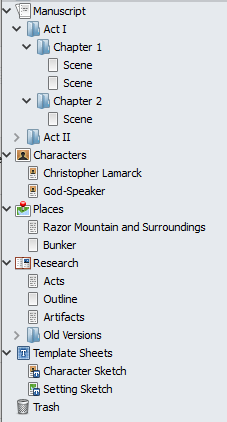
Usually, that’s the point when I open up a project in scrivener. Within a project, I can have many files: chapters, character descriptions, research notes, and anything else I want to track.

Scrivener's "Binder" - a simple file tree

This might seem like a small thing – a collection of files in a simple hierarchy – but I find it much more effective to have everything for the story one click away (as opposed to files in a collection of folders). Even when I’m in the middle of editing or writing, I can quickly find my notes. Scrivener includes some templates for characters and settings that you can use or ignore, as you prefer. Parts, chapters and scenes can also be broken down in as much detail as you would like. I personally prefer to have each chapter in its own document, but you can choose more or less granularity.

Outlining

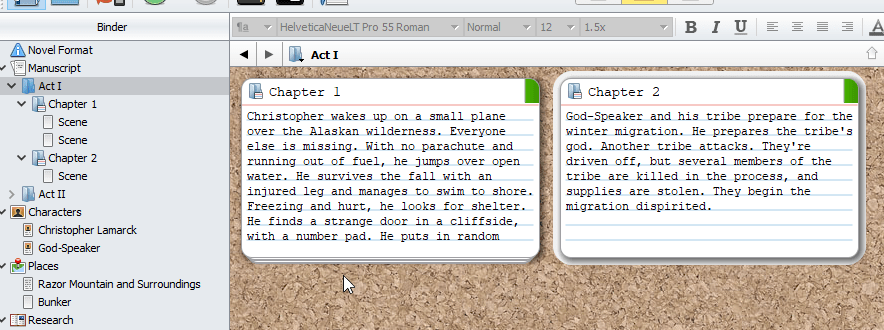
When I write the outline to a novel, I generally take a two-pronged approach. First, I tend to write out chapter summaries in sequence, in a single file. When I start writing a chapter, I take that summary and paste it into the chapter document’s “synopsis” field.

In addition to the file tree, Scrivener has a cork-board view. In this view, you can see notecards with the synopsis of each chapter (or even each scene, if you like). Reordering is as simple as dragging notecards on the board, or documents in the tree.

Writing

When it comes to writing, Scrivener doesn’t compete for the most comprehensive formatting options. It can’t do the fancy layouts of something like InDesign or Publisher, or even Word. It gives you the standard tools you’d expect: text fonts, colors, sizes, emphasis, alignment; a handful of preset options like quote, heading or title; and some basic layout elements like lists and tables.

As far as I’m concerned, that’s enough. I’m not designing a magazine, I’m writing fiction. That said, you may find the options a bit limited if you’re trying to put together something like a travel guide, where you have lots of pictures, maps, or charts among and alongside your words.

If you like to split up your long works into individual chapter or scene documents, you can easily see them combined together by selecting multiple documents in the tree and selecting the “composite” view. Scrivener will instantly stitch all the documents together in the order you specify (with or without page breaks).

Project Tracking

Scrivener allows you to set word count goals for an entire project, or a single session – useful if you’re tracking progress for a deadline, or participating in something like National Novel Writing Month. You can also pull up stats like word counts or printed/paperback page counts for the entire project, or an arbitrary selection. Tools like Word Frequency can even occasionally help you spot your writerly tics.

There are also color-coded labels and keywords that can be applied to documents and searched. This is honestly not a feature I have ever used, and it seems a bit clunky, but if you’re incredibly organized and want to put in the extra effort to be able to cross-reference certain things across many documents, it may be useful. For me, the full-text search has generally been adequate.

Other Features

Scrivener includes a few other features I haven’t used, mostly because they’re for other styles of writing. It supports scriptwriting in a number of different formats. It also handles bibliographies, citations, and footnotes. It includes some simple tools for translating or looking up terms via various websites (e.g. thesaurus and dictionary.com).

Backup and Sync

Unlike many products today, Scrivener is a desktop application. There is no web-only option. It’s available on Windows, Mac, and iOS, and the different versions must be purchased separately (although they’re still relatively cheap, and there are slightly discounted bundle deals).

Scrivener also doesn’t handle its own backups or syncing between devices. It does offer some support for integrating with Dropbox for backup and sync, and I’ve found that this works pretty well between my Windows PC, somewhat outdated MacBook Air, and my phone.

Scrivener is not a cloud application by any stretch of the imagination, and this is one of the few places where I personally feel there is some room for improvement. I don’t particularly want an online Google-Docs-style editor, but seamless syncing with less setup would be nice.

Publishing

Scrivener provides some import and export options, which are mostly useful if you want to pull in plain text files or get them out of Scrivener as plain ol’ text. It also offers “compilation” options, which combine the text of the chapters or scenes into a single file, with many formats available. This can be used for e-publishing (epub, mobi, PDF), or to import into other tools (Word, Open Office, HTML, Post Script, Final Draft, LaTex). You can even print, if you prefer words on paper.

Try it Out

Scrivener is one of my most-utilized writing tools. It’s not perfect, but it contains a blend of features that really work well for me. In a world where everything seems to be subscription-based, I also appreciate their customer-friendly business model. They offer a 30-day free trial (that’s days-used, not calendar days), and if you do buy, it’s a one-time purchase to own the current version forever.

It’s also worth noting that they have modest student discounts, and they typically offer discounts for participants of NaNoWriMo in November, if that’s something you’re into.

Check it out at Literature and Latte.

Reference Desk – #2 – Interactive Fiction

Innovation in Fiction

As a software developer, innovation is part of my everyday life. My job is to grow and improve the software I’m responsible for. I use technologies that are regularly updated, and new tech is always being invented to improve on the old. Innovation is everywhere, and it’s constant.

As a writer, “innovation” is a much more nebulous term.

You might call challenging, complex language and structure innovative. James Joyce is popular largely because of this. Or you might consider experiments in formatting and typography to be innovative, such as Danielewski’s House of Leaves. But how innovative are these things, really? They’re still words, printed inside a book. You still read them from front to back. They’re still attempting to deliver a story from the writer to the reader.

Fiction has been around for so long, and it is so ubiquitous, that it’s difficult to find ways to truly innovate. But I’d argue there is at least one type of fiction that is genuinely innovating, by testing and expanding the boundaries of what fiction can be. As you might have guessed from the title, it’s called interactive fiction.

Where most fiction involves the creator (such as a writer or director) delivering a story to the consumer (a reader or viewer), interactive fiction turns this on its head, and says that the consumer should be an active participant in the story. This is a fairly broad scope, and can include media as diverse as books, movies and video games.

Choose Your Own Adventure

One of the most iconic forms of interactive fiction is the Choose Your Own Adventure book series that was popular in the ’80s and ’90s. This was probably my first experience with interactive fiction. These books, aimed at kids, contained a branching narrative that used a second-person perspective to make the reader the protagonist. Every few pages, the reader would be presented with a choice (usually with two options, occasionally with more). Each choice pointed the reader to a specific page where the story would continue.

These stories approached interactive fiction from the angle of books with choices, but this was the time period where personal computing was beginning to come into its own on a large scale, and others were approaching interactive fiction from a different direction: stories told through computer software.

Video Games

Games like Zork and its sequels provided a narrative in text, but also included game elements such as puzzles and simple battles. By using the computer to parse commands from the player, a much richer set of interactions could be developed. Even simple (and often cryptic) commands like “go north” or “hit troll” gave the player much more freedom than the binary options provided by Choose Your Own Adventure.

(Unfortunately, the promise of parsers that could effectively parse arbitrary plain-text commands from users never materialized. Modern computer scientists and tech giants still haven’t managed to produce AI that can carry on a simple conversation, decades later.)

As computer graphics advanced, these story-focused games would influence the graphical adventure games of the ’90s, popularized by LucasArts and Sierra, and role-playing games all the way up to the present day.

The limitations of early computer graphics were a boon to interactive fiction. Some games painted rich and detailed worlds in text at least partly because graphics were so limited. However, the graphics have become more and more advanced, effectively killing the commercial viability of genres like text and graphical adventure games.

In modern times, it’s still possible to find games that pride themselves on narrative depth – huge AAA role-playing and adventure games, and all manner of small-team indies. However, even as graphics and gameplay have advanced tremendously, there seems to be comparatively little exploration of how the player can interact with the narrative in interesting ways. Much of the interesting work on this front is happening not in the huge, successful game studios with multi-million dollar budgets, but in small, independent studios with niche audiences.

Fallen London

One such example is Fallen London, a browser game that has been around for a decade and continues to put out new content every few weeks. Fallen London has some of the classic video game trappings: character stats in the form of vague attributes (watchful, shadowy, dangerous, and persuasive), as well as an expansive item system. However, all of these systems work in service of the story. The story itself is branching and immense – millions of words doled out a few paragraphs at a time.

The story is the main content and the reward. Whereas most free games would ask players to pay for shiny graphical customizations and costumes, convenience features, or a bigger, sharper sword, Fallen London offers pay-to-play stories, and rewards cleverness or hard work with more words and perhaps the chance to learn something about a character or faction in the sprawling story.

Rather than the simple binary options of Choose Your Own Adventure, or the flexible-but-sometimes-inscrutable commands of Zork, Fallen London uses a system of semi-randomized “opportunity cards” that the player draws. Each card offers an opportunity – a small story or snippet of a larger narrative. Which cards can appear in a player’s deck depends on the location of their character, as well as the character’s attribute scores and qualities. Qualities can be anything from a profession to living arrangements to acquaintances to quirks of personality. The choices available are dependent on a wide variety of choices already made by the player along with a bit of luck and randomness.

This kind of game shows the immense range of possibilities available when game systems that have normally been used for gameplay are turned toward deep, interactive narrative, where the player can feel like their choices matter. Failbetter Games, the makers of Fallen London, have been coming up with new and innovative systems for interactive fiction for years.

Exploring Interactive Fiction

While interactive fiction remains something of a niche, it has many vibrant and growing communities. There has probably never been a better time to explore.

I’d highly recommend at least dabbling in Fallen London. It’s free to play, but has an energy system that limits how frequently the player can take action. They’ve also built up an impressive library of additional stories for purchase.

The Interactive Fiction tag on Steam shows hundreds of games, ranging from classic text-adventure RPGs to visual novels.

The Interactive Fiction Database, Interactive Fiction Archive, and the Interactive Fiction Community Forum are all great resources to find interesting works.

Writing Interactive Fiction

The quantity and quality of tools for writing interactive fiction has exploded in recent years.

To get started, or just play around a little, Twine and InkleWriter are two excellent, free tools that can be used without any programming experience.

However, depending on how elaborate you want to get, there are many, many tools. Some of these can be quite technical. At the most technical end of the spectrum, there are many interactive fiction writers who code their own engines so they can tell their stories with very specific forms of interaction. The IF Community Forum has a section dedicated to tools that is a great resource.

The Craft of Interactive Fiction

One of the most exciting things about IF is that it’s still a relatively new and fresh medium. Authors are still exploring how it can be used, and innovation is happening all the time. Much like traditional fiction, one of the best ways to learn is to read or play a few stories. There are also plenty of discussions going on if you like to dig deep into theory and analysis.

  • The Failbetter Blog – The makers of Fallen London have interesting insights on narrative structure, as well as making interactive fiction as a business.
  • Emily Short – The only individual I’ll mention here, and it’s because she is the most prolific and insightful author I’ve found on the topic of interactive fiction. Check out her blog and her talks. She also has some great resource lists for digging deeper.
  • The Interactive Fiction Community Forum – A wealth of discussion on the technical and literary details of writing IF.

Try it Out

This is a topic that really interests me, so I’m sure I’ll be coming back to it again in the future. For now, if it sounds interesting to you, try writing a bit of interactive fiction yourself, and let me know what you come up with!

The Reference Desk – #1 – Start With This

Over the years, I’ve picked up useful information and ideas from books, websites, podcasts, and other resources about writing. In this ongoing series, I’d like to share some of those things with you. For the most part, these are going to be things that are interesting to other writers. However, if you’re a reader who enjoys learning “how the sausage is made,” you may find them interesting as well.

Start With This

Start With This is a podcast by Joseph Fink and Jeffrey Cranor. If they sound familar, it’s probably because of their most popular project, the podcast “Welcome to Nightvale.” Nightvale is something like small-town lovecraftian horror, with a healthy dose of humor, seen through the lens of local public radio.

Start With This is a writing podcast that comes in comfortable, 30-minute installments. Each bi-weekly episode focuses on a particular theme, like “Feedback” or “Collaboration.” First, the hosts talk a bit about their own experiences in that particular arena. Then they provide some homework: one thing to create (usually a short exercise relating to the theme) and one thing to consume (some work that exemplifies the theme).

The hosts have plenty of experience in theater and live shows, as well as podcasting, and since they’ve been working together for years, they have good rapport. The episodes feel snappy and focused.

Because of the pair’s experience, the show skews a bit toward podcasts in particular and theater in general, but there is enough content for a writer outside these media that I still find the show worth listening to.

The show also caters to various levels of listener enthusiasm. I’ve found that I get something useful simply listening, but the “create” and “consume” assignments add another layer for those who want to invest the time. There is also a subscription-based forum where true enthusiasts can discuss the episodes and assignments, and find collaborators.